Can you define your own class that uses a Frame class as a base (parent) class?
A good answer might be:
Sure. The Frame class is a class like any other and can be extended.
Extending the Frame Class
The usual way of writing a GUI is to define your own specialized class by extending the AWT's Frame class. Here is a program that does that. It also includes several other new features.
import java.awt.*;

class myFrame extends Frame
{

  // paint is called automatically whenever the system needs
  // to display the frame.  Most of the work is done using methods
  // in the AWT; then at the end this paint method is called.
  public void paint ( Graphics g )
  {
    g.drawString("A myFrame object", 10, 50 );  // write a String in the Frame
                                                // at location x=10 y=50
  }

}

public class ezGUI2
{
  public static void main ( String[] args )
  {
    myFrame frm = new myFrame(); // construct a myFrame object
    frm.setSize( 150, 100 );     // set it to 150 pixels wide by 100 high
    frm.setVisible( true );      // ask it to become visible on the screen
  }
}
|
 The Java system automatically has methods which display a Frame
on the screen (you saw them at work in the previous program.)
The class myFrame extends the class Frame.
The Frame class has a paint() method which
is called by the Java system whenever a Frame is to be displayed.
If you want display something besides what is displayed automatically,
override the paint() method in your child class.
The Java system automatically has methods which display a Frame
on the screen (you saw them at work in the previous program.)
The class myFrame extends the class Frame.
The Frame class has a paint() method which
is called by the Java system whenever a Frame is to be displayed.
If you want display something besides what is displayed automatically,
override the paint() method in your child class.
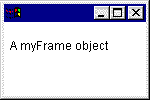
The picture shows what the program displays. As with the previous program, you will have to hit control-c in the DOS window to stop the program. (Remember to first click inside the DOS window so the control-c goes to the right place.)
QUESTION 11:
Why does the main() method of ezGUI2
NOT do this: frm.paint() ?