A good answer might be:
The program is an application. It has a main() which is where it starts running.
Running the GUI Program
Even though it does not do much,
you should run this program and play with it
(a GUI is worth a thousand words).
But first (especially for Windows 95) close any important programs
you might have running (or at least save the game).
You are about to hit control-c,
and it might be sent to the wrong program.
To run the program,
do this:
first, copy-paste-save the program to a file called
ezGUI1.java.
Then:
C:\> javac ezGUI1.java
C:\> java  ezGUI1

         program runs and displays the frame

HIT control-c
C:\>
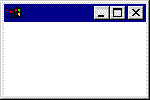
When the program runs, it displays a frame like the one shown. If you click on the usual "close button" of the frame, (the small "X" inside a square) nothing happens because there is no listener for this event. To stop the program, type control-c in the DOS window. (You do this by clicking in the DOS window to be sure that it has focus, then holding down the "Ctrl" key while typing a "c" character.)
While the program is running, you can click on the frame and drag it around, you can minimize it, you can grab a border and resize it, and so on. All of this come free. All you have to do is ask for a Frame object in your program and you get all this.
QUESTION 7:
What do you suppose this line from the program does?
Frame frm = new Frame();
Click Here after you have answered the question