A good answer might be:
Container classes are used to contain other GUI components.
Event Listener Object
When a GUI program is running, each action of the user generates an event. The following are some types of events:
- Moving the mouse.
- Clicking the mouse on a button.
- Typing some text into a text area.
|
An event listener is an object that "listens" for events from a specific GUI component (which is also an object.) When an event is generated by the GUI component, a method in the listener object is invoked to respond to the event. In order to respond to events, your program must have done two things:
- It must create an event listener object for the type of event.
- It must register the listener object with the GUI component that generates the event (or with a component that contains it.)
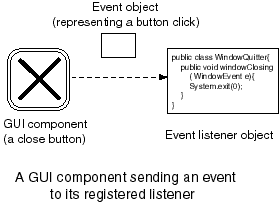
An event in Java is represented as an object. When an event happens, The Java system creates an event object. The event object is then sent to the listener that has been registered for the GUI component.
In the picture, the component is the "close-window" button of a frame. The event is a click on that button. An Event object is sent to the registered listener when the user clicks on the button. This is done by the Java system, which manages the GUI components. It is up to the listener to do something. If you think this is somewhat complicated, you are right.
QUESTION 3:
If our simple GUI program had a listener for window events what would it do when it received a "window closing event" due to a click on the "close-window" button?
Click Here after you have answered the question