A good answer might be:
A container class is a class who's objects can hold other GUI components, such as buttons.
Example Program with a Button
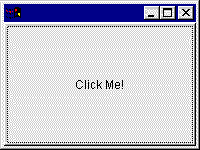
Here is a sample program, nearly the same as the one in the previous chapter, with the addition of a button. The Button class is defined in the AWT. To construct a Button object, use new, as with all classes. Now you have a Button object, but you still need to do something with it. This program adds a Button to the Frame when the Frame is constructed.
import java.awt.*;
import java.awt.event.*;

public class buttonDemo extends Frame
{
  // construct a Button
  Button bChange = new Button("Click Me!");

  // constructor for buttonDemo
  buttonDemo()
  {
    // add the button to the Frame
    add( bChange );
  }

  public static void main ( String[] args )
  {
    buttonDemo frm = new buttonDemo();

    WindowQuitter wquit = new WindowQuitter();
    frm.addWindowListener( wquit );

    frm.setSize( 200, 150 );
    frm.setVisible( true );
  }
}
|
class WindowQuitter
    extends WindowAdapter
{
  public void windowClosing( WindowEvent e )
  {
    // what to do for this event
    // --exit the program
    System.exit( 0 );
  }
}
|
This program has a listener for the window-closing button of the frame. Clicking the "close button" at the top of the frame will exit the program. Note: the frame's "close button" is NOT an instance of class Button.
You can "copy-paste-save-and-run" the program in the usual way, but do so in two "copy-and-paste" steps, one for the left and one for the right half of the program.
C:\> javac buttonDemo.java
C:\> java buttonDemo
C:\>
The entire frame is filled with the Button! (We will fix this shortly.) You can move the mouse pointer over the Button and click on it, but nothing happens in response to that event.
QUESTION 2:
Click Here after you have answered the question