A good answer might be:
There should be a small button in the center of the screen.
Layout Manager
When you add() buttons (and other components) to a frame, a layout manager automatically decides what size they will be and where they will go. This is convenient, because you can add components without worrying about the details. The layout manager is like a little artist inside the computer. You just say what things you want "in the picture" and the layout manager lays out the picture.
The layout manager sometimes makes odd choices. However, there are several kinds of layout managers in the AWT. Each layout manager has a different style of positioning components within the container. Usually there is a layout that will do the job you want.
Our program will look better if it uses the FlowLayout manager. The FlowLayout manager puts components into the frame row by row in the order they are added. It also picks reasonable sizes for buttons. (Later on we will add more than one component.) Here is how you ask for this manager:
public class buttonDemo extends Frame
{
  Button bChange = new Button("Click Me!");  // construct a Button

  buttonDemo()                               // constructor for buttonDemo
  {
    setLayout( new FlowLayout() );           // choose the layout manager
    add( bChange );                          // add the button to the container
  }

  public static void main ( String[] args )
  {
    buttonDemo frm = new buttonDemo();
      . . . . .
  }
}
|
When this is done, and the program is compiled and run, this is what is displayed:
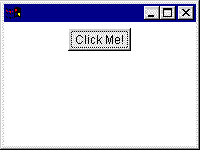
This looks better than the previous, default, choice.
It is possible to do the layout yourself, avoiding a layout manager. You can say exactly where you want a component to go and what size it will be.
But these notes will not cover that.
QUESTION 4:
(Review: ) when the button is clicked, where should its events be sent?
Click Here after you have answered the question