A good answer might be:
Button-click events are delivered to the actionPerformed() method,
but it always does the same thing,
regardless of which button is clicked.
Picture of the Problem
Look again at the method:
public class TwoButtons extends Frame implements ActionListener
{
  Button redButton = new Button("Red");
  Button grnButton = new Button("Green");
  . . . .

  public void actionPerformed( Action Event evt)
  {
    setBackground( Color.blue );
    repaint();                           // ask the system to paint the screen.
  }

  . . . .
}
|
The picture below shows the story. Event objects from both buttons are delivered to the same method, which changes the background to blue no matter what event it receives.
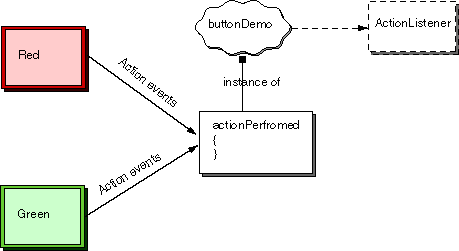
We would like the ActionEvent that is delivered to actionPerformed()
to say what should be done.
To do this, you can associate a different command with each button using
its
setActionCommand(String command)
method.
Now each button sends its command (a String) as part of
the ActionEvent when it is clicked.
The actionPerformed() method uses the command to see
what to do.
If you don't use setActionCommand() to assign a command to a button,
the command it sends will be the same as its label.
This is usually OK, but sometimes it is awkward.
QUESTION 12:
What object(s) is setActionCommand( ) part of?