A good answer might be:
Yes.
Display of a FileDialog
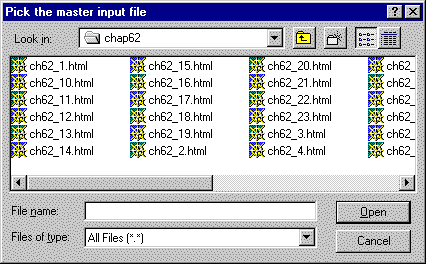
To the left is an example of what a FileDialog object
displays on the screen.
The components that it contains,
and it itself,
are part of the AWT hierarchy.
It is a fairly complicated component,
constructed of other components.
These Notes will not discuss how to use this component (although it is not hard). It is presented as an example of what the charts can tell you and what can be done with the AWT.
The large rectangle that lists the files is a TextArea.
The bar at its bottom is a ScrollBar.
You should recognize the TextField
(labeled "File name").
The other boxes that look somewhat like TextField
are Choice objects (sometimes called drop-down lists.)
Good object oriented design is illustrated in this component.
The FileDialog class inherits
many of its components and behavior
from the Dialog class.
Only new components and behavior needs to be added.
The components of the class are part of AWT hierarchy,
and can be added to FileDialog class
(because it inherits the characteristics of the
Container class).
Look over the charts another time to get an idea of how all this works. However, this is a complicated notion, so don't expect to see everything clearly. It was probably difficult for the designers of Java to figure all this out and get it to work.
QUESTION 6:
If you want to use some of these other GUI components, where should you look?
Click Here after you have answered the question